GoldSrc Decal Maker runs in your browser · nothing is uploaded
Turn any PNG / JPG / JPEG / BMP into a Half-Life 1 (GoldSrc) spray tempdecal.wad.
github.com/BaakWu/goldsrc-decal-web ·
Privacy · MIT License
How it works
Everything runs in your browser — your image is never uploaded. The tool builds the
tempdecal.wad and a preview, and you download the file to your computer.
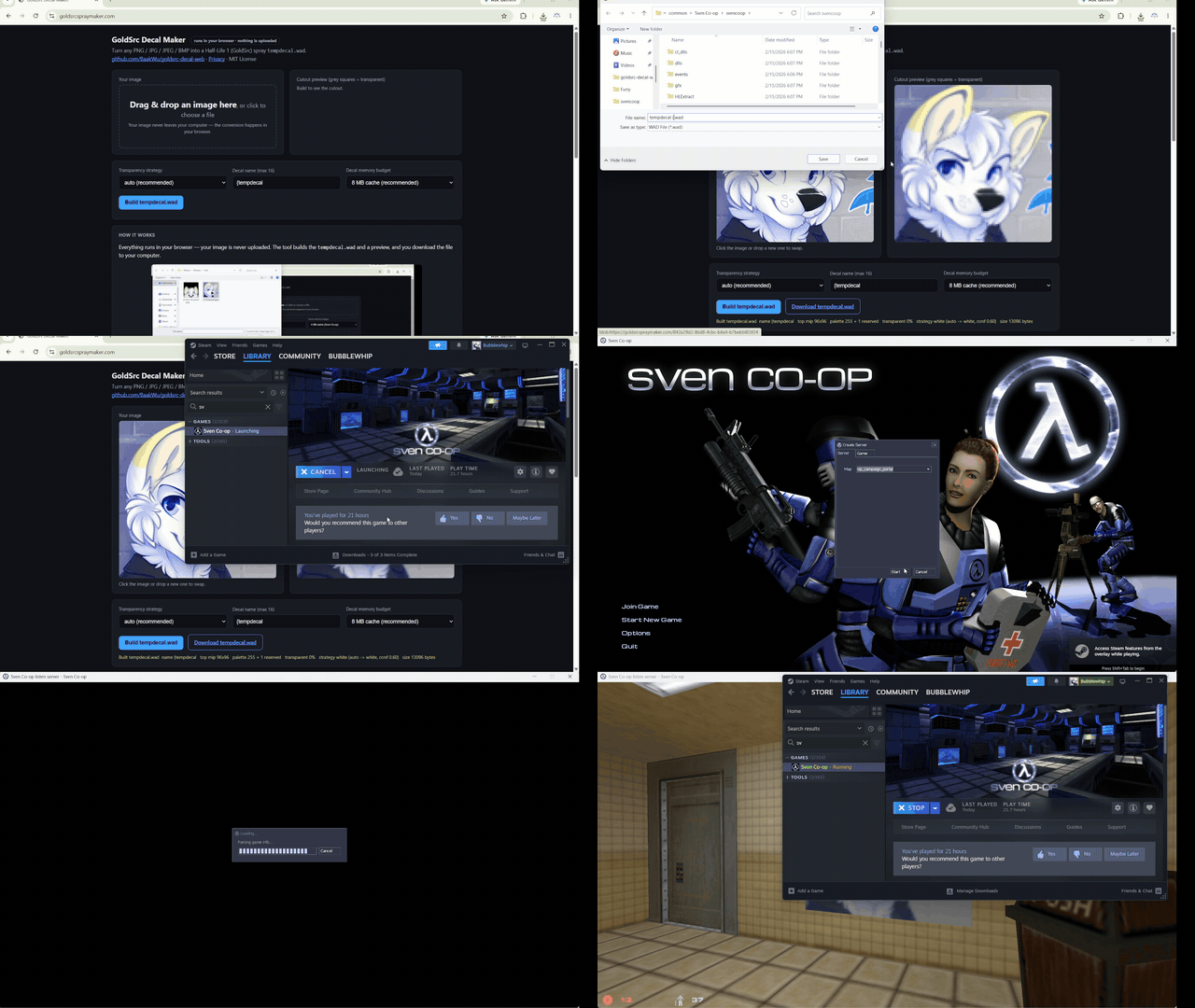
What is tempdecal.wad?
A custom spray (decal) format used by GoldSrc games — Half-Life, Counter-Strike 1.6,
and Sven Co-op. By default these games ship only a few preset sprays; a
tempdecal.wad lets you spray any image you like, including full-color ones.
Where do I put the file?
Copy your tempdecal.wad into the folder shown for your game:
- Sven Co-op:
Sven Co-op\svencoop - Half-Life:
Half-Life\valve - Counter-Strike 1.6:
Half-Life\cstrike
To find your Game Folder, open Steam → Library, right-click the game and
choose Manage > Browse local files.
Recommended: set tempdecal.wad to read-only (right-click → Properties → check
Read-only) so the game can't overwrite your custom spray with a default one.
Sven Co-op
Enable custom sprays: launch the game → Options → Multiplayer → Advanced..., then under Graphics set Custom player sprays to Enabled.
Pick a Decal memory budget that matches your Sven Co-op texture cache:
- 2 MB cache — tightest fit, guaranteed to load on the smallest budget
- 4 MB cache — lighter budget
- 8 MB cache — recommended; works on Sven Co-op
- 16 MB cache — largest, only if your game supports it
Supported image formats
PNG, JPEG, BMP — and generally any raster format your browser can load (except SVG).
Are you stealing my data or keeping my photos?
No. There is no back end. No server, no API, no account, no analytics, no cookies, no network requests. This page is two files — index.html and decal-core.js — that your browser downloads once and then runs entirely locally. When you pick an image, it is read straight into your browser’s memory, processed by JavaScript on your own machine, and turned into the tempdecal.wad you download. The file never crosses the network. You could even open this page from a USB stick, with Wi-Fi off, and it would still work.
Project
Repository: github.com/BaakWu/goldsrc-decal-web
License: MIT © 2026 BaakWu
Privacy policy
Last updated: 13 September 2026.
Your files stay on your device. The selected image, its filename, your settings, and the generated WAD and preview are processed locally in your browser. They are never uploaded or sent to the site owner, Cloudflare, or GitHub.
- The app sets no cookies or persistent browser storage.
- The app includes no analytics, advertising, fingerprinting, or other user tracking.
- Reloading or closing the page clears its working data. Files you download remain on your device until you delete them.
Cloudflare hosting. The hosted site uses Cloudflare for DNS and static hosting. Cloudflare automatically processes routine technical data needed to serve and protect the site, which may include your IP address, request time, requested URL, browser or user-agent information, and security or routing data. This does not include anything you enter into or create with the converter. Cloudflare handles that data under its Privacy Policy.
The site owner does not add to Cloudflare's collection, sell personal data, or use it for
advertising or profiling. Opening index.html locally avoids a hosted site
request altogether. GitHub applies its own privacy policy only if you choose to follow a
link to GitHub.
Questions about this policy can be submitted through the project issue tracker. Issues are public, so do not include sensitive information.